Welcome! This page has information and resources that will help you succeed in your online courses.
View your class schedule in your mySiskiyous portal to confirm your enrollment and to review when your online course(s) will start. Are you having trouble accessing your mySiskiyous portal? Contact the Student Help Desk.
If you need internet access, the campus provides Internet access for students at both the Weed and Yreka campuses. If you want to learn more about campus Internet access, visit the Technology Services page.
Your COS student email account is used for all official communications from the College, so please be sure to check it regularly or have it forwarded to an account you check often.
COS uses Microsoft Office 365 for student email and other web-based Office programs. You can access your Office 365 account by logging into your mySiskiyous portal from the COS home page.
If you are having trouble with your COS email, contact the Student Help Desk.
Some instructors may choose to allow access to their courses before the semester begins, and some will not publish their course or contact you until the semester begins. Instructors are not required to have the class available to you until the very first day that the semester begins.
You can access your Canvas courses through either the COS home page or your mySiskiyous portal. Using the Canvas link, you will be taken directly to the Canvas login, which is the same as your mySiskiyous login.
Note: The home page will look different if you access it from your phone browser. Select the Canvas menu option to continue to the login.
If you are already logged in, the Canvas card will take you directly to your Canvas Dashboard. From the Canvas dashboard, select the course tile you want to access.
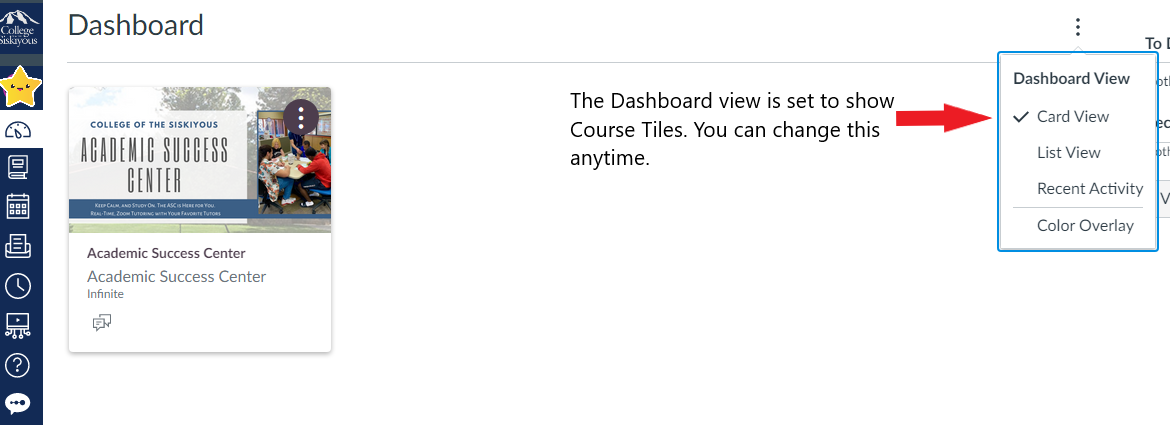
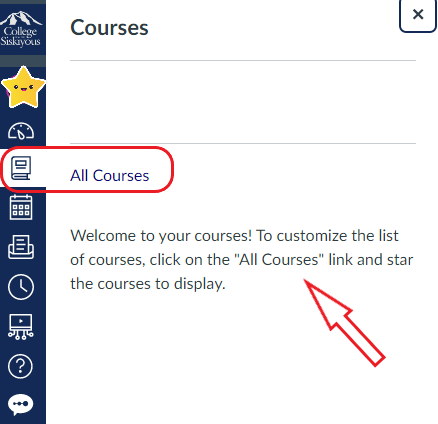
If you cannot access the class, or you don't see your class, select the Courses icon in your Canvas main menu as shown below. Select the "All courses" link to view your past and future courses. "Star" the courses you want to display.
Still can't see your course? If your enrollment is confirmed, contact the instructor when the course starts, or even a few days before.
The Canvas by Instructure app is the mobile version of Canvas that helps you stay current with your courses anywhere you go. Download the app using the link for Android or Apple. Having the app keeps your courses at your fingertips!
Before contacting your instructor regarding technical problems, you can always contact the Student Help Desk:
Drop-In Zoom Room
Email: studenthelpdesk@siskiyous.edu
Phone: (530) 938-5523
Ask for help. Don't try so hard to figure it out yourself that you end up frustrated.
Canvas offers after hours and weekend technical support through the 24/7 chat support feature. Use the Help icon located in your Canvas main menu to access Canvas guides and support options, as shown in the screenshot.
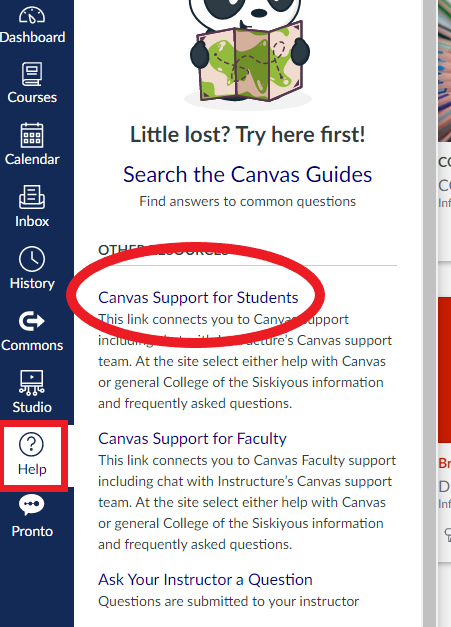
The Canvas Support for Students link in the Canvas Help menu will take you to the Canvas Support page.
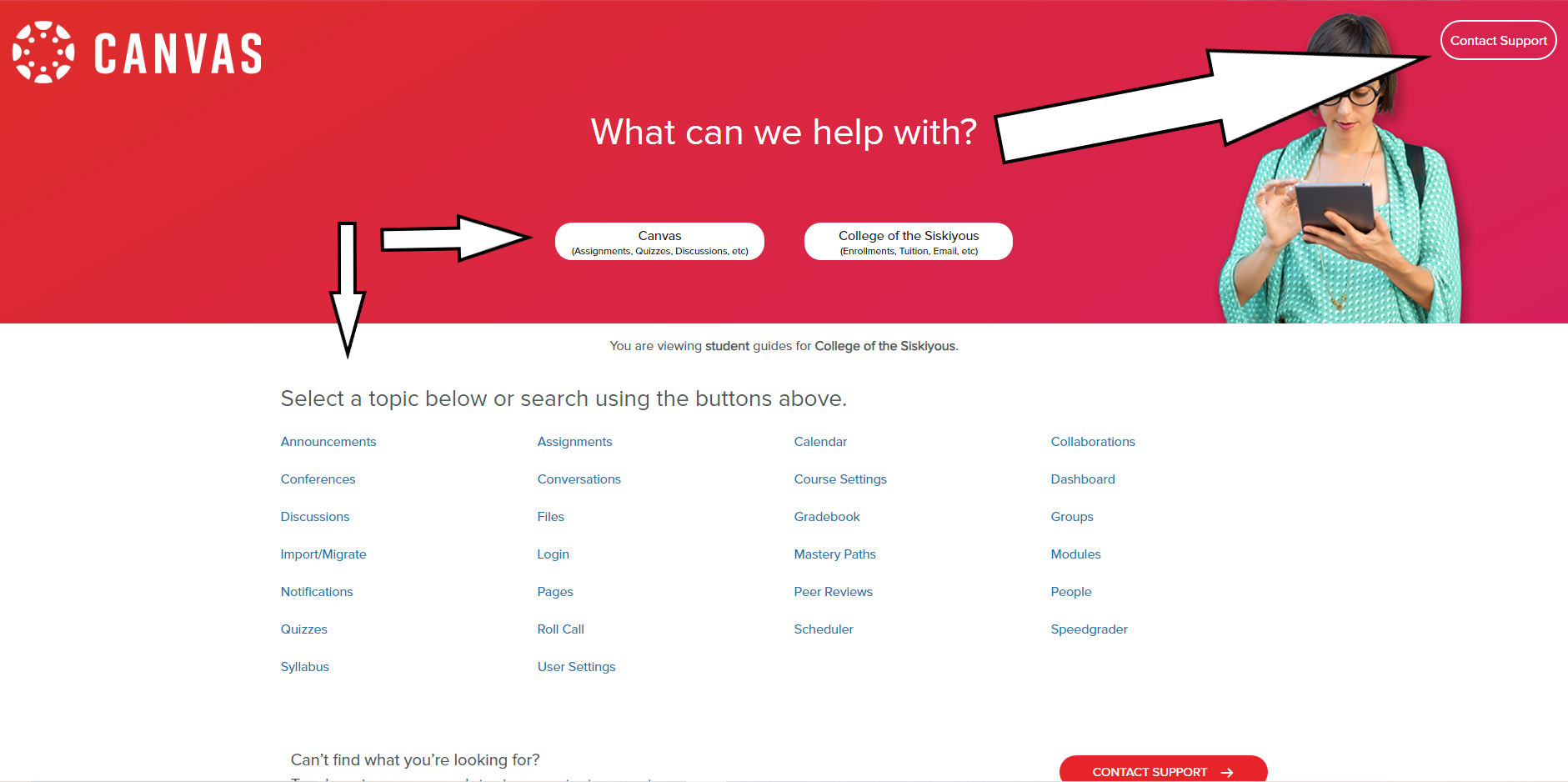
The Canvas support page contains links to search buttons and support options, as seen in the screenshot below. The white arrows point to the Contact Support link in the upper right corner of the page, and also to the search buttons and topics for the COS guides:
Each of the tiles link to more specific information and resources to help you stay on track.

Providing support services, specialized instruction, and educational accommodations to students with disabilities so that they can participate as fully and benefit as equitably from the college experiences as their non-disabled peers.

Live online tutoring and writing help for your classes when you can't go to our on-campus support center.

Live and online "EdTALKS" supporting you in your quest to maximize your learning potential, build healthy habits and mindsets, and feel connected to our COS community.

The COS Library connects you to great resources wherever you are. Students can access research assistance and online services, textbooks, and book checkouts & returns.
Basecamp is our on-campus Student Equity and Support Services space. Basecamp has a food pantry, grab-and-go snacks, as well as household and personal supplies. Students can also apply for loaner laptops, book vouchers, and more.

The Canvas guides contain all the information and How-To resources that will help you troubleshoot, use, and customize your Canvas experience.
College of the Siskiyous online courses may use Honorlock for online exam proctoring. Online proctoring, sometimes referred to as remote proctoring, uses AI and live proctors to monitor your exam session to support you and provide a fair testing environment. Honorlock combines AI and live test proctors to make online proctoring simple, easy, and human. Learn more about Honorlock now.
Email: distlearn@siskiyous.edu
Phone: (530) 938-5520

 mySiskiyous
 Athletics